

Close Menu
    What's Hot

    GPT‑6 Astra Debuts: Things to Do

    September 4

    Atlas Multimodal World Model with Camera Control Released

    September 2

    MiniMax Now Used for Interactive AI Livestreams

    August 31
    Facebook X (Twitter) Instagram
    • AI Robots
    • AI News
    • Text to Video AI Tools
    • ChatGPT
    Facebook X (Twitter) Instagram Pinterest Vimeo
    Rad NeuronsRad Neurons
    • AI Robots
      • AI Coding
    • ChatGPT
    • Text to Video AI
    Subscribe
    Rad NeuronsRad Neurons
    Home » ChatGPT’s Canvas Shows What’s Changed with “Show Changes” Option
    ChatGPT

    ChatGPT’s Canvas Shows What’s Changed with “Show Changes” Option

    AI NinjaBy AI NinjaOctober 171 Min Read
    Share Facebook Twitter Pinterest LinkedIn Tumblr Reddit Telegram Email
    Share
    Facebook Twitter LinkedIn Pinterest Email

    ChatGPT’s Canvas has been a gamechanger whether you are interested in coding or writing projects. You can use it to adjust length, reading level, programming language, and a lot more. OpenAI has now announced that you can now easily monitor the changes with the show changes icon.
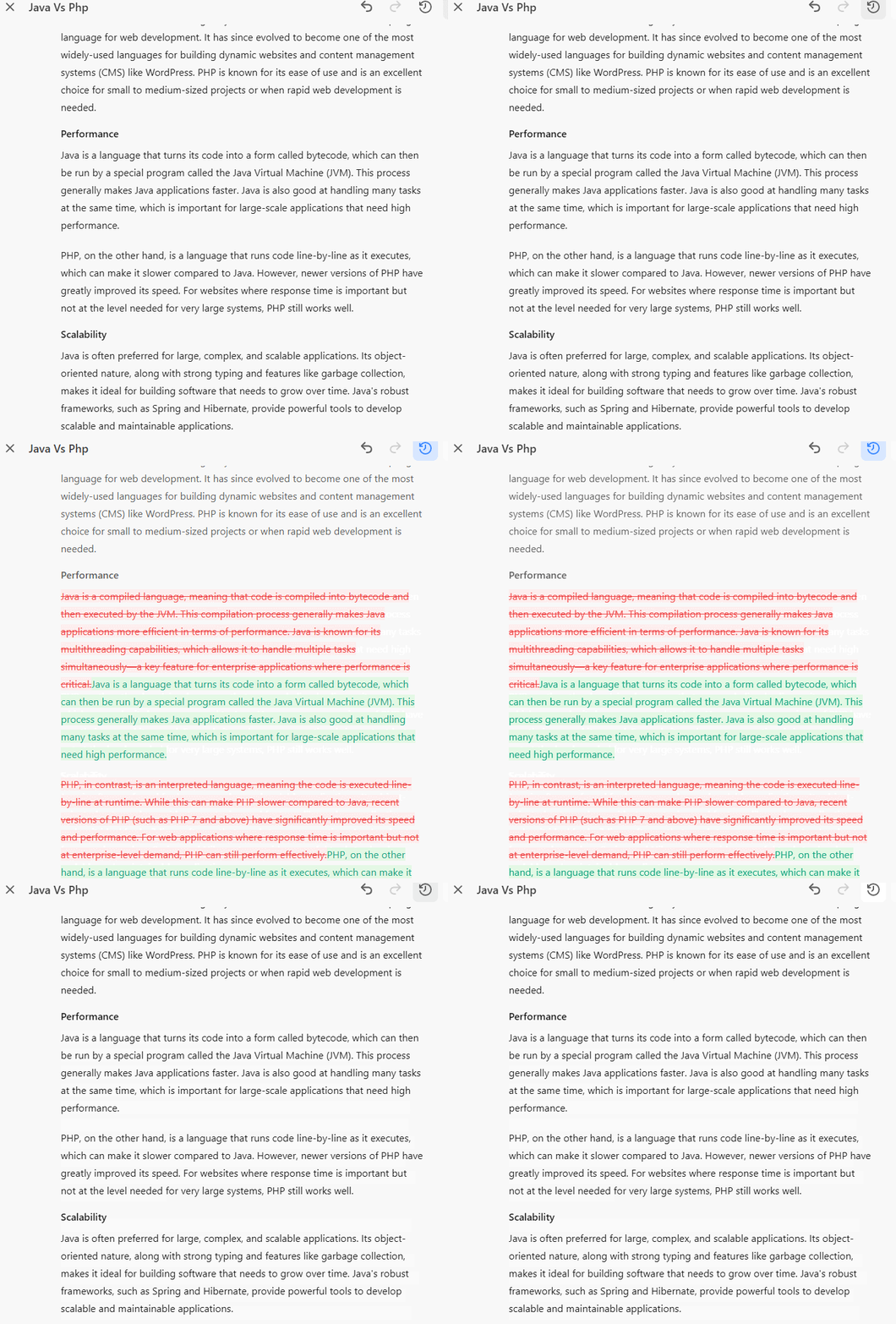
    In my case, I first asked ChatGPT to write a blog post about the differences between Java and PHP. I used Canvas to adjust a couple of paragraphs to make them more easily understandable to people who have no programming knowledge. By clicking on “Show Changes” icon, I was able to see what exactly was changed.

    When using canvas, you can now see what's changed in your writing and code by selecting the "Show changes" icon.

    Enjoy! pic.twitter.com/5d9mGW3R7g

    — OpenAI (@OpenAI) October 17, 2024

    A pretty handy feature if you ask me. What else would you change about ChatGPT?

    canvas ChatGPT
    Share. Facebook Twitter Pinterest LinkedIn Tumblr Email
    Previous ArticleTad AI: New AI Music Generator, Suno Killer?
    Next Article NoteBookLM Now Lets You Customize Audio Overviews
    AI Ninja
    • Website

    Related Posts

    ChatGPT

    GPT‑6 Astra Debuts: Things to Do

    September 4
    ChatGPT

    Workspace Agents in ChatGPT Announced

    April 23
    ChatGPT

    How to Run AI Locally [Infographic]

    January 9
    Add A Comment
    Leave A Reply Cancel Reply

    Top Posts

    Controlling an iPhone with Claude’s Computer Use?

    October 2512 Views

    Aero-1-Audio 1.5b Parameter Audio Language Model for Automatic Speech Recognition

    May 17 Views

    Qwen2.5-Max MoE Language Model That Competes with Claude, DeepSeek V3

    January 3019 Views
    More
    AI News

    Atlas Multimodal World Model with Camera Control Released

    AI NinjaSeptember 2
    AI News

    MiniMax Now Used for Interactive AI Livestreams

    AI NinjaAugust 31
    AI News

    Autonomous Computer 2: 2 x RTX 5090 AI Workstation

    AI NinjaAugust 28
    Most Popular

    Prompt Cannon: Run Prompts Across Multiple Models

    June 243,888 Views

    Dipal D1 2.5K Curved Screen 3D AI Character

    June 231,105 Views

    How to Use Claude in Unity & Unreal Engine with MCP

    March 191,043 Views
    Our Picks

    GPT‑6 Astra Debuts: Things to Do

    September 4

    Atlas Multimodal World Model with Camera Control Released

    September 2

    MiniMax Now Used for Interactive AI Livestreams

    August 31
    Tags
    3D agent AI AI model ai video API avatar canvas ChatGPT Claude Claude Code coding DeepSeek Gemini glasses GPT Grok Hailuo Hermes Higgsfield image kling leonardo LLM MCP midjourney Minimax Mini PC model music nano banana o3 OpenAI OpenClaw open source QWEN robot runway sora text to video Veo 3 Vibe coding video video model Voice

    © 2026 Rad Neurons. Inspired by Entropy Grid
    • Home
    • Terms of Use
    • Privacy Policy
    • Disclaimer

    Type above and press Enter to search. Press Esc to cancel.