

Close Menu
    What's Hot

    DuClaw: OpenClaw on Baidu AI Cloud

    March 11

    Autonomous Intern 1-Min OpenClaw Gadget

    March 11

    Nvidia Working ON NemoClaw AI Agent Platform

    March 10
    Facebook X (Twitter) Instagram
    • AI Robots
    • AI News
    • Text to Video AI Tools
    • ChatGPT
    Facebook X (Twitter) Instagram Pinterest Vimeo
    Rad NeuronsRad Neurons
    • AI Robots
      • AI Coding
    • ChatGPT
    • Text to Video AI
    Subscribe
    Rad NeuronsRad Neurons
    Home ยป How to Use Claude To Control Your Computer
    AI Tips

    How to Use Claude To Control Your Computer

    AI NinjaBy AI NinjaNovember 61 Min Read
    Share Facebook Twitter Pinterest LinkedIn Tumblr Reddit Telegram Email
    Share
    Facebook Twitter LinkedIn Pinterest Email

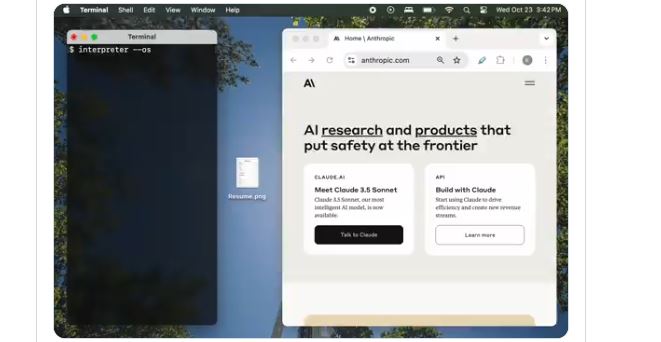
    Claude’s Computer Use was announced a couple of weeks ago. People have been putting it to good use since then. It can be used to automate workflows, summarize emails, and serve as an assistant for your browser. As it turns out, you can easily use it to control your computer. This video shows how you can use Open-Interpreter to use Claude on your computer.

    Want to use Claude to control your computer?

    pip install open-interpreter
    interpreter –os

    Works on Windows and Mac. Have fun ๐Ÿ™‚ pic.twitter.com/73YrxaTQGm

    โ€” killian (@hellokillian) October 24, 2024

    Open Interpreter uses LiteLLM to connect to hosted language models. You will need the following to change the model:

    interpreter –model gpt-3.5-turbo
    interpreter –model claude-2
    interpreter –model command-nightly

    To install it, just use this command:

    pip install open-interpreter

    Open Interpreter can also use an OpenAI-compatible server to run models locally.

    [HT]

    AI Claude
    Share. Facebook Twitter Pinterest LinkedIn Tumblr Email
    Previous ArticleMini Pupper 2 AI Robot Dog with ChatGPT, Gemini Support
    Next Article Runway Gen-3 Alpha Turbo Advanced Camera Controls Guide
    AI Ninja
    • Website

    Related Posts

    AI Gadgets

    Autonomous Intern 1-Min OpenClaw Gadget

    March 11
    AI Coding

    You Can Now Run Qwen 3.5 On Your iPhone 17 Pro

    March 3
    AI Gadgets

    Samsung Galaxy Buds4 Pro Wireless AI Bluetooth Earbuds with 2-Way Speaker

    March 2
    Add A Comment
    Leave A Reply Cancel Reply

    Top Posts

    Hunyuan-Large-Vision MoE Model for Understanding Images, Videos

    August 1212 Views

    Qwen2.5-VL Vision Agentic AI Model Released

    January 284 Views

    MagicMotion: Controllable Image to Video Generation

    March 2151 Views
    More
    AI News

    DuClaw: OpenClaw on Baidu AI Cloud

    AI NinjaMarch 11
    AI News

    Nvidia Working ON NemoClaw AI Agent Platform

    AI NinjaMarch 10
    AI News

    OpenClaw: You Can Now Use Claude Code, Codex In Telegram

    AI NinjaMarch 9
    Most Popular

    Prompt Cannon: Run Prompts Across Multiple Models

    June 243,759 Views

    Dipal D1 2.5K Curved Screen 3D AI Character

    June 231,065 Views

    How to Use Claude in Unity & Unreal Engine with MCP

    March 19946 Views
    Our Picks

    DuClaw: OpenClaw on Baidu AI Cloud

    March 11

    Autonomous Intern 1-Min OpenClaw Gadget

    March 11

    Nvidia Working ON NemoClaw AI Agent Platform

    March 10
    Tags
    3D agent AI AI model ai video API avatar canvas ChatGPT Claude Claude Code coding DeepSeek ElevenLabs Gemini glasses GPT Grok Higgsfield image kling leonardo LLM midjourney Minimax Mini PC model music nano banana o3 offline OpenAI OpenClaw open source QWEN robot runway sora text to video Veo 2 Veo 3 Vibe coding video video model Voice

    © 2026 Rad Neurons. Inspired by Entropy Grid
    • Home
    • Terms of Use
    • Privacy Policy
    • Disclaimer

    Type above and press Enter to search. Press Esc to cancel.